Microservices architectures have transformed software development, offering tremendous scalability and flexibility. But every architecture introduces unique challenges. Have you ever found yourself with a client app making too many API calls to gather data from multiple services, creating a “chatty” interface and hurting user experience?
The Gateway Aggregation Pattern might be exactly what you’re looking for. Let’s delve deeply into this powerful architectural approach, exploring how it simplifies your frontend development, reduces network traffic, and enhances your application’s performance.
1 Gateway Aggregation: The “What” and “Why”
1.1 Core Concept: Defining Gateway Aggregation
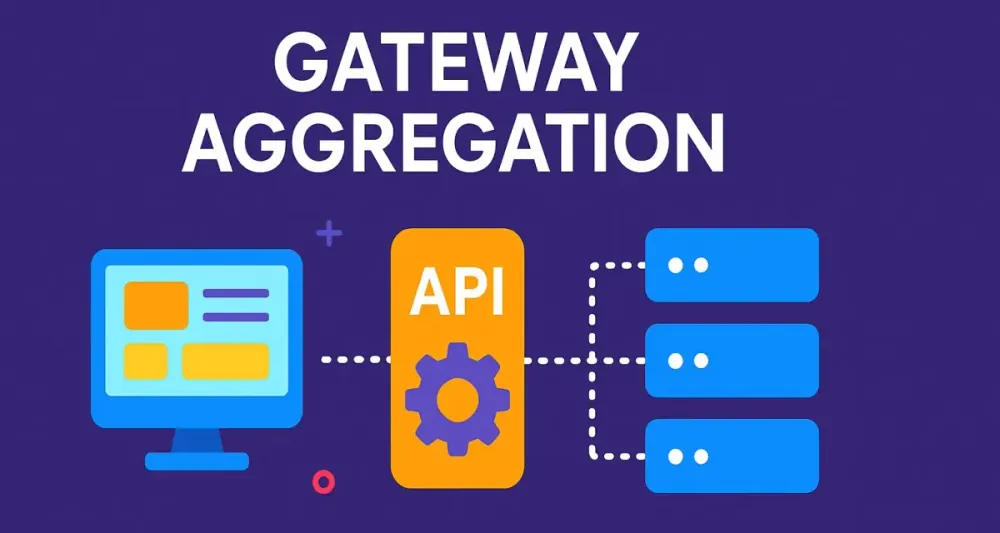
Gateway Aggregation is a pattern where a single client endpoint (typically within an API gateway or standalone aggregation service) retrieves and combines data from multiple, independent downstream microservices.
Think of this as your gateway serving as a “chef” who gathers ingredients from different suppliers (your microservices) to prepare a complete meal (a cohesive data set) for your client.
Instead of clients managing multiple individual requests and stitching responses together, the gateway handles this complexity seamlessly, delivering exactly what the client needs in one request-response cycle.
1.2 The Problem it Solves: Overcoming “Chatty” Clients
Microservices naturally encourage fine-grained APIs. While beneficial for flexibility and modularity, this approach often leads to multiple requests from the client-side to assemble a single piece of functionality or UI view. This creates:
- Excessive network calls
- Increased latency and slow performance
- Complexity in client-side logic
Gateway Aggregation solves this issue by consolidating the communication, dramatically simplifying the client-side logic, reducing round trips, and improving user experience.
Consider an e-commerce site showing a product details page. Without aggregation, your frontend might independently fetch:
- Product details from the product microservice
- Reviews from the reviews microservice
- Inventory status from the inventory microservice
That’s three separate API calls for one simple view! Gateway aggregation neatly solves this problem by reducing these calls into a single, cohesive response.
1.3 Gateway Aggregation vs. API Gateway
There’s often confusion between “Gateway Aggregation” and “API Gateway”. Here’s the key clarification:
- API Gateway: A broader concept, typically a single entry point that routes requests, manages security, performs load balancing, and handles rate limiting.
- Gateway Aggregation: A specialized capability or behavior that is frequently implemented within an API gateway but can also exist as a standalone service.
In other words, Gateway Aggregation is typically a feature provided by an API Gateway but is not restricted exclusively to that context.
2 Core Principles and Architectural Fit
2.1 Request/Response Aggregation
At the core, Gateway Aggregation means receiving a single client request, internally dispatching multiple parallel or sequential requests to backend microservices, and consolidating their responses into one comprehensive reply.
Think of a relay race: the aggregator fetches each required dataset, hands it off to the next step if needed, and then neatly compiles all results to send back to the client.
2.2 Decoupling Client and Services
Gateway aggregation helps decouple the frontend clients from the intricacies of backend microservices. This creates a significant architectural advantage:
- Clients no longer depend directly on the microservice interfaces.
- Microservices can evolve independently without necessarily breaking frontend apps.
- API endpoints become stable, well-defined contracts tailored specifically for client needs.
2.3 The Role of the Aggregator
Understanding the aggregator’s role involves three critical components:
The Aggregator Service
An aggregator service can either be a dedicated microservice or a module within an API gateway. Its responsibilities include:
- Receiving client requests.
- Coordinating and executing calls to downstream services.
- Composing and transforming responses.
Downstream Services
These microservices own specific data domains, such as customer information, product catalog, or order management. They remain focused and fine-grained, ensuring each service adheres strictly to its own bounded context.
The Composite Data Transfer Object (DTO)
Aggregated data is typically returned as a Composite DTO. This structured object contains combined responses from multiple microservices, optimized specifically for client consumption.
Example of a composite DTO:
public record ProductDetailsDto(
    ProductInfoDto ProductInfo,
    IEnumerable<ReviewDto> Reviews,
    InventoryStatusDto InventoryStatus
);
3 Architectural Blueprint: When to Use Gateway Aggregation
Gateway Aggregation is immensely useful in specific scenarios. Let’s explore the prime situations when this pattern shines brightest.
3.1 Optimizing Complex UI Views
Consider an online retailer’s product page. The UI combines multiple data sets:
- Product specifications and images
- User reviews
- Current inventory levels
Each dataset comes from separate microservices. Without aggregation, the frontend would need multiple API calls and client-side orchestration.
With Gateway Aggregation, your backend fetches all required information and serves it in a single API call:
C# Example with ASP.NET Core Minimal API:
app.MapGet("/api/product-details/{productId}", async (Guid productId, IHttpClientFactory clientFactory) =>
{
    var productClient = clientFactory.CreateClient("ProductService");
    var reviewsClient = clientFactory.CreateClient("ReviewsService");
    var inventoryClient = clientFactory.CreateClient("InventoryService");

    var productTask = productClient.GetFromJsonAsync<ProductInfoDto>($"/products/{productId}");
    var reviewsTask = reviewsClient.GetFromJsonAsync<IEnumerable<ReviewDto>>($"/reviews/{productId}");
    var inventoryTask = inventoryClient.GetFromJsonAsync<InventoryStatusDto>($"/inventory/{productId}");

    await Task.WhenAll(productTask, reviewsTask, inventoryTask);

    return new ProductDetailsDto(
        ProductInfo: productTask.Result!,
        Reviews: reviewsTask.Result!,
        InventoryStatus: inventoryTask.Result!
    );
});
This pattern neatly consolidates and abstracts complex orchestration, leaving your frontend clean and straightforward.
3.2 Mobile and Low-Bandwidth Clients
For mobile apps or users in remote areas, each additional network request significantly impacts user experience. Gateway Aggregation dramatically improves responsiveness by minimizing round trips.
Instead of multiple slow requests, your mobile client benefits from just one, fast, aggregated response. Your app stays snappy even on weak networks.
3.3 Simplifying Frontend Logic
Gateway Aggregation removes complex logic from the client side. Frontends no longer need to manage:
- Parallel API calls and error handling
- Complex data transformations
- Network reliability concerns
Your frontend developers can instead focus purely on creating amazing user experiences.
Consider the analogy of ordering food delivery. Would you rather place separate orders at five restaurants or order once from a single delivery service that gathers your items into one delivery? The aggregator provides this simplicity and reliability.
4 Implementation in .NET: A Practical Guide
Microservices architectures and API aggregation are prevalent in enterprise .NET ecosystems. However, robust aggregation requires a thoughtful selection of frameworks, patterns, and code practices. In this section, you’ll discover how to implement gateway aggregation in .NET, focusing on both REST and GraphQL paradigms, with attention to code clarity and production-readiness.
4.1 The .NET Toolkit for Building Aggregators
HttpClientFactory: Efficient HTTP Management
Historically, managing outgoing HTTP requests in .NET could lead to problems such as socket exhaustion or DNS resolution issues, especially when creating many HttpClient instances. The introduction of HttpClientFactory in .NET Core brought a standardized way to create and manage HttpClient lifetimes efficiently.
Key advantages include:
- Reuse: Under the hood, connections are reused, reducing resource consumption.
- Configuration: Centralized configuration for each downstream service (base addresses, authentication, etc.).
- Resilience: Integrates easily with Polly for retry and circuit-breaker patterns.
Example configuration in Program.cs:
builder.Services.AddHttpClient("ProductService", client =>
{
    client.BaseAddress = new Uri("https://product.api.internal/");
});

builder.Services.AddHttpClient("ReviewService", client =>
{
    client.BaseAddress = new Uri("https://review.api.internal/");
});

builder.Services.AddHttpClient("InventoryService", client =>
{
    client.BaseAddress = new Uri("https://inventory.api.internal/");
});
By giving each downstream service a distinct name, you keep your aggregation logic clean and maintainable.
Task.WhenAll: Maximizing Parallelism
Modern C# allows you to kick off multiple asynchronous operations and await their results together with Task.WhenAll. For gateway aggregation, this pattern is a game changer. It lets your aggregator service fetch from multiple microservices in parallel, significantly reducing the overall response time.
A practical illustration:
var productTask = productClient.GetFromJsonAsync<ProductInfoDto>($"products/{productId}");
var reviewTask = reviewClient.GetFromJsonAsync<IEnumerable<ReviewDto>>($"reviews/{productId}");
var inventoryTask = inventoryClient.GetFromJsonAsync<InventoryStatusDto>($"inventory/{productId}");

await Task.WhenAll(productTask, reviewTask, inventoryTask);
Here, each task runs concurrently. The aggregator awaits all tasks, then composes the results, ensuring the overall API is as fast as the slowest downstream call—not the sum of all their times.
YARP (Yet Another Reverse Proxy): A Modern Host for Aggregation
While YARP’s primary role is to provide a robust, configurable reverse proxy for .NET, its extensibility makes it a natural fit for custom aggregation logic. With YARP, you can route, transform, and even combine downstream responses, merging the power of high-performance reverse proxying with bespoke C# orchestration.
For scenarios where you need to integrate aggregation tightly with proxying, YARP provides hooks and extensibility points—think custom middleware and pipeline stages. This can allow you to:
- Intercept responses from multiple downstream services.
- Compose a new response before returning to the client.
- Apply policies such as caching or authentication centrally.
Let’s see how these principles play out in concrete implementation patterns.
4.2 Implementation Pattern 1: A Standalone Aggregator Service
In many architectures, it’s preferable to keep aggregation logic explicit and transparent in a dedicated service. This section outlines how to build such a service in ASP.NET Core, using contemporary .NET features.
Architecture Overview
Imagine an ASP.NET Core Web API project whose primary purpose is to serve as the aggregation endpoint. It receives a single client request, orchestrates outbound calls to multiple microservices, and returns a consolidated DTO.
- Each downstream service is represented by a named
HttpClient. - The aggregator performs parallel requests using
Task.WhenAll. - The final response is composed and mapped to a client-friendly DTO.
Example: Building the Aggregator Endpoint
Let’s consider the aggregation of product details, reviews, and inventory, a common scenario for an e-commerce app.
Step 1: Inject HttpClientFactory
In your controller or minimal API handler, inject IHttpClientFactory:
public class ProductDetailsController : ControllerBase
{
    private readonly IHttpClientFactory _httpClientFactory;

    public ProductDetailsController(IHttpClientFactory httpClientFactory)
    {
        _httpClientFactory = httpClientFactory;
    }
}
Step 2: Aggregate Data Concurrently
Here’s how you’d orchestrate concurrent requests and compose the final response:
[HttpGet("api/product-details/{productId}")]
public async Task<ActionResult<ProductDetailsDto>> GetProductDetails(Guid productId)
{
    var productClient = _httpClientFactory.CreateClient("ProductService");
    var reviewClient = _httpClientFactory.CreateClient("ReviewService");
    var inventoryClient = _httpClientFactory.CreateClient("InventoryService");

    var productTask = productClient.GetFromJsonAsync<ProductInfoDto>($"products/{productId}");
    var reviewTask = reviewClient.GetFromJsonAsync<IEnumerable<ReviewDto>>($"reviews/{productId}");
    var inventoryTask = inventoryClient.GetFromJsonAsync<InventoryStatusDto>($"inventory/{productId}");

    await Task.WhenAll(productTask, reviewTask, inventoryTask);

    // Simple error handling example
    if (productTask.Result == null) return NotFound("Product not found.");

    var dto = new ProductDetailsDto(
        ProductInfo: productTask.Result,
        Reviews: reviewTask.Result ?? Enumerable.Empty<ReviewDto>(),
        InventoryStatus: inventoryTask.Result ?? new InventoryStatusDto { InStock = false }
    );

    return Ok(dto);
}
Step 3: Strongly-Typed Composite DTO
Your DTO reflects the needs of the UI, not the internal structure of your microservices:
public record ProductDetailsDto(
    ProductInfoDto ProductInfo,
    IEnumerable<ReviewDto> Reviews,
    InventoryStatusDto InventoryStatus
);

public record ProductInfoDto(Guid Id, string Name, string Description, decimal Price);
public record ReviewDto(Guid ReviewId, string Reviewer, string Text, int Rating);
public record InventoryStatusDto(bool InStock, int QuantityAvailable);
Step 4: Handling Failures Gracefully
You might not always get a response from every downstream service. Build resilience with policies such as retries, fallbacks, and timeouts. For example, you could use Polly to add transient-fault handling:
builder.Services.AddHttpClient("ProductService", client =>
{
    client.BaseAddress = new Uri("https://product.api.internal/");
})
.AddTransientHttpErrorPolicy(policyBuilder =>
    policyBuilder.WaitAndRetryAsync(3, retryAttempt => TimeSpan.FromSeconds(Math.Pow(2, retryAttempt))));
You can also implement circuit breakers or fallback strategies for unavailable services, improving overall system robustness.
Benefits of the Standalone Aggregator
- Explicit Logic: Aggregation logic is clear, testable, and evolves independently.
- Observability: You can trace, log, and monitor the aggregation process for debugging or optimization.
- Maintainability: Each endpoint reflects a specific UI or use-case, simplifying ongoing changes.
4.3 Implementation Pattern 2: Aggregation within a GraphQL Endpoint
While RESTful endpoints suit many scenarios, increasingly, organizations embrace GraphQL for its flexibility. Gateway aggregation is inherent to GraphQL’s approach: clients specify precisely what they need, and the backend composes responses from many sources transparently.
Architecture Overview
- The API exposes a single GraphQL endpoint.
- The schema spans multiple microservices.
- Resolvers fetch data from downstream services, often using HTTP.
- The Data Loader pattern minimizes N+1 queries.
Choosing a .NET GraphQL Platform
Hot Chocolate is the leading GraphQL server for .NET, offering rich schema modeling, advanced resolver features, and deep integration with ASP.NET Core.
Step-by-Step: Aggregating with GraphQL
Step 1: Define the Schema
Suppose your client needs to query a product, its reviews, and current inventory. Your schema might look like this:
type Query {
  productDetails(productId: ID!): ProductDetails
}

type ProductDetails {
  info: ProductInfo
  reviews: [Review]
  inventory: InventoryStatus
}

type ProductInfo {
  id: ID!
  name: String!
  description: String
  price: Decimal!
}

type Review {
  reviewer: String!
  text: String!
  rating: Int!
}

type InventoryStatus {
  inStock: Boolean!
  quantityAvailable: Int!
}
Step 2: Write GraphQL Resolvers in C#
Create a resolver class. Here’s how a root resolver might look:
public class Query
{
    public async Task<ProductDetailsDto> GetProductDetails(
        [Service] IHttpClientFactory httpClientFactory, Guid productId)
    {
        var productClient = httpClientFactory.CreateClient("ProductService");
        var reviewClient = httpClientFactory.CreateClient("ReviewService");
        var inventoryClient = httpClientFactory.CreateClient("InventoryService");

        var productTask = productClient.GetFromJsonAsync<ProductInfoDto>($"products/{productId}");
        var reviewTask = reviewClient.GetFromJsonAsync<IEnumerable<ReviewDto>>($"reviews/{productId}");
        var inventoryTask = inventoryClient.GetFromJsonAsync<InventoryStatusDto>($"inventory/{productId}");

        await Task.WhenAll(productTask, reviewTask, inventoryTask);

        return new ProductDetailsDto(
            ProductInfo: productTask.Result,
            Reviews: reviewTask.Result,
            InventoryStatus: inventoryTask.Result
        );
    }
}
With Hot Chocolate, you wire up your schema in Program.cs:
builder.Services
    .AddGraphQLServer()
    .AddQueryType<Query>();
Step 3: Using DataLoader to Prevent N+1
GraphQL’s flexibility can sometimes lead to inefficiencies. For instance, if a client requests multiple products and their reviews, naïve resolvers might cause many sequential HTTP requests—an instance of the dreaded N+1 problem.
Hot Chocolate’s DataLoader support solves this by batching and caching requests efficiently:
public class ProductDetailsType : ObjectType<ProductDetailsDto>
{
    protected override void Configure(IObjectTypeDescriptor<ProductDetailsDto> descriptor)
    {
        descriptor
            .Field(t => t.Reviews)
            .ResolveWith<ProductResolvers>(r => r.GetReviewsAsync(default, default, default));
    }
}

public class ProductResolvers
{
    public async Task<IEnumerable<ReviewDto>> GetReviewsAsync(
        [Parent] ProductDetailsDto product,
        ReviewsDataLoader reviewsDataLoader,
        CancellationToken cancellationToken)
    {
        return await reviewsDataLoader.LoadAsync(product.ProductInfo.Id, cancellationToken);
    }
}
Here, ReviewsDataLoader batches review fetches for all requested products into one outbound HTTP call per service, per request—maximizing efficiency.
Step 4: Flexible Client Queries
The beauty of GraphQL is that clients request only the data they need. For example:
query {
  productDetails(productId: "be2a9915-0c62-4bb8-83ae-dc33e97e8837") {
    info { name, price }
    reviews { reviewer, rating }
  }
}
The aggregation layer fetches data from the appropriate services and delivers a single, precise response, without overfetching or underfetching.
Advantages of GraphQL Aggregation
- Ultimate Flexibility: Clients specify fields, reducing both under- and over-fetching.
- Centralized Aggregation Logic: Complex orchestration, batching, and error handling stay on the server.
- Simpler Frontends: Teams can iterate on UI without backend schema changes for every new requirement.
Recap: REST vs. GraphQL for Aggregation
- RESTful Aggregators excel when you have well-defined, scenario-specific endpoints or wish to optimize for particular UI views. They keep things explicit and easy to monitor.
- GraphQL Aggregators shine for highly dynamic, data-driven frontends where consumers need to shape their data flexibly.
Both approaches benefit immensely from .NET’s modern toolkit—HttpClientFactory for robust HTTP management, Task.WhenAll for concurrency, YARP for advanced proxying and routing, and libraries like Hot Chocolate for a sophisticated GraphQL experience.
5 Performance and Scalability Considerations
Performance is a primary reason for introducing gateway aggregation in the first place. Yet, the pattern brings its own set of scalability challenges and optimizations that must be understood and engineered deliberately.
5.1 Parallel Execution: Maximizing Throughput
At the heart of efficient gateway aggregation lies parallel execution. The very promise of reducing end-user latency is realized only if the aggregator issues concurrent, non-blocking calls to downstream microservices. If you fall back on sequential requests, your aggregator’s total response time becomes the sum of each service’s response time—wiping out any efficiency gains.
Parallelism in .NET
In .NET, you achieve concurrency simply and safely with Task.WhenAll, as covered earlier. Each request kicks off immediately, and the gateway waits for all to return. This approach maximizes throughput and keeps the aggregator responsive under load.
Example: When an aggregator endpoint must call three microservices, the correct approach is:
var productTask = clientA.GetAsync("products/123");
var reviewTask = clientB.GetAsync("reviews/123");
var inventoryTask = clientC.GetAsync("inventory/123");

await Task.WhenAll(productTask, reviewTask, inventoryTask);

// Map each response...
If you instead awaited each call one after another, you’d triple the latency and invite resource starvation under load. Always review your aggregation code for accidental serialization of outbound calls.
5.2 Timeouts and Deadlines: Containing Slowness
A single sluggish or stalled downstream service can drag down the entire aggregation operation. To safeguard both user experience and backend stability, set explicit timeouts for every outbound request.
Timeouts in Practice
In .NET, timeouts are best configured per named client via HttpClientFactory:
builder.Services.AddHttpClient("InventoryService", client =>
{
    client.BaseAddress = new Uri("https://inventory.api/");
    client.Timeout = TimeSpan.FromSeconds(2); // Fast failover
});
Beyond setting timeouts at the HTTP layer, consider using cancellation tokens to propagate deadlines throughout the aggregation pipeline, so operations do not linger past their usefulness.
5.3 Caching Strategies: Serving with Speed
Repeatedly aggregating from stable sources wastes both time and infrastructure resources. Strategic caching within the aggregator can offer dramatic improvements in latency and throughput, especially for data that changes infrequently.
Caching in Aggregators
- In-memory cache: Suitable for small-scale or infrequently changing datasets.
- Distributed cache (e.g., Redis): Necessary for horizontally scaled aggregators or larger data volumes.
Practical Example: If product catalog information rarely changes, cache it in memory for a short interval:
public class ProductAggregator
{
    private readonly IMemoryCache _cache;
    private readonly IHttpClientFactory _factory;

    public ProductAggregator(IMemoryCache cache, IHttpClientFactory factory)
    {
        _cache = cache;
        _factory = factory;
    }

    public async Task<ProductInfoDto> GetProductInfoAsync(Guid productId)
    {
        return await _cache.GetOrCreateAsync(productId, async entry =>
        {
            entry.AbsoluteExpirationRelativeToNow = TimeSpan.FromMinutes(10);
            var client = _factory.CreateClient("ProductService");
            return await client.GetFromJsonAsync<ProductInfoDto>($"products/{productId}");
        });
    }
}
Caching can reduce aggregator load, downstream pressure, and user latency. The key is tuning cache lifetimes to your data’s volatility.
6 Error Handling and Resiliency
Microservices environments are inherently distributed and thus, inherently failure-prone. The aggregator’s role as an orchestrator makes robust error handling, fault isolation, and transparency vital.
6.1 Partial Failures: Degrading Gracefully
When an aggregator requests from three services and one fails, what should happen? Always failing the entire operation is rarely best for user experience. Gateway aggregators should be designed to handle and communicate partial failure, returning available data while transparently reporting missing segments.
Example Partial Response Strategy:
try
{
    await Task.WhenAll(productTask, reviewTask, inventoryTask);
}
catch
{
    // Log and continue to build as complete a DTO as possible
}

var dto = new ProductDetailsDto(
    ProductInfo: productTask.IsCompletedSuccessfully ? productTask.Result : null,
    Reviews: reviewTask.IsCompletedSuccessfully ? reviewTask.Result : Enumerable.Empty<ReviewDto>(),
    InventoryStatus: inventoryTask.IsCompletedSuccessfully ? inventoryTask.Result : null
);
Informing the client about which pieces are missing lets UI developers build tolerant interfaces that degrade gracefully.
6.2 Circuit Breakers: Isolating Failure
If a downstream service begins to fail consistently, an aggregator that continues to hammer it will only compound the problem, risking wider system failure. Enter the circuit breaker pattern.
With Polly in .NET, you can easily add circuit breakers to your HTTP clients:
builder.Services.AddHttpClient("ReviewService")
    .AddTransientHttpErrorPolicy(policy => policy
        .CircuitBreakerAsync(
            handledEventsAllowedBeforeBreaking: 5,
            durationOfBreak: TimeSpan.FromSeconds(30)
        ));
This setup means that after five consecutive failures, the aggregator will wait 30 seconds before retrying. Calls during the open period fail immediately, allowing the failing service time to recover and shielding users from unpredictable latency.
6.3 Logging and Correlation IDs: Observability Across Boundaries
The aggregator sits at the crossroads of many systems. Effective observability—rich, actionable logs with end-to-end traceability—is non-negotiable.
Implementing Correlation IDs
- Generate or extract a unique correlation ID for every inbound request.
- Attach this ID to all outbound requests and log entries.
- Downstream services include the same ID in their logs.
Example with .NET middleware:
app.Use(async (context, next) =>
{
    var correlationId = context.Request.Headers["X-Correlation-ID"].FirstOrDefault() ?? Guid.NewGuid().ToString();
    context.Items["CorrelationId"] = correlationId;
    context.Response.Headers["X-Correlation-ID"] = correlationId;

    using (LogContext.PushProperty("CorrelationId", correlationId))
    {
        await next();
    }
});
Tools like Serilog or OpenTelemetry further enhance cross-service tracing, helping diagnose bottlenecks and failure points with confidence.
7 Common Pitfalls and Anti-Patterns
No architectural pattern is immune to misuse. Gateway aggregation, in particular, invites a few recurring mistakes that can compromise system integrity, performance, and maintainability.
7.1 The Monolithic Aggregator
One of the most insidious anti-patterns is allowing the aggregator to accumulate significant business logic. The aggregator’s mandate is data composition and light transformation—not enforcing business rules, workflows, or calculations.
Why is this a problem?
- Business logic quickly becomes duplicated or inconsistent.
- Aggregators turn into bottlenecks and single points of failure.
- The system drifts back towards monolithic tendencies.
Best practice: Push business logic to the services where the data and the authority reside. The aggregator only composes, never owns, business rules.
7.2 Sequential (Blocking) Calls
It’s easy to inadvertently revert to sequential outbound requests—especially when dealing with conditional logic or complex orchestration. But this approach drastically increases user-perceived latency.
Example of a subtle mistake:
var resultA = await clientA.GetAsync("serviceA");
var resultB = await clientB.GetAsync("serviceB"); // Waits for resultA before starting
Solution: Start all requests first, then await them together. Always audit for this pattern when reviewing aggregation code.
7.3 Ignoring Data Consistency
Aggregators frequently combine data from multiple sources that may not update in lockstep. For example, product info and inventory may not be perfectly synchronized at the instant a request is made.
Implications:
- Users might see stale or inconsistent information.
- Downstream changes may not be reflected uniformly.
Mitigation strategies:
- Clearly document data consistency guarantees and limitations.
- Use eventual consistency where real-time accuracy is not essential.
- For critical operations, consider explicit refresh or polling mechanisms.
8 Evaluating the Trade-offs: Advantages vs. Limitations
No architectural approach is free from compromise. Gateway aggregation offers compelling benefits, but must be evaluated in light of your system’s unique needs and constraints.
8.1 Advantages
Reduced Client-Side Complexity
The most immediate benefit is a dramatic simplification of frontend code. Clients need only one call to fetch all data needed for a composite UI, freeing them from network orchestration, error handling, and transformation logic.
Improved Performance
By collapsing multiple network calls into a single, aggregated response, round trips and serialization overhead are minimized. The pattern’s focus on parallel execution further ensures responsiveness even as backend systems scale horizontally.
Enhanced Encapsulation
The aggregator shields clients from the internal organization of your microservices. You’re free to evolve internal service contracts and architectures without destabilizing client code or API consumers.
8.2 Limitations
Increased Service-Side Complexity
Aggregation logic, resilience policies, and caching introduce their own operational complexity. Your aggregator must be as carefully engineered and maintained as any first-class service.
Potential Bottleneck
A poorly designed or underscaled aggregator can itself become a single point of failure or a performance choke point. High availability, load balancing, and horizontal scalability are non-negotiable for aggregators in production.
Code Duplication
As your set of composite DTOs grows, you may find that DTO definitions or transformation logic are duplicated between the aggregator and client libraries. Regular code reviews and careful factoring are needed to avoid divergence and drift.
9 Conclusion: Best Practices for .NET Architects
As you consider introducing or evolving a gateway aggregation pattern in your architecture, these guiding principles can keep your solution robust, maintainable, and future-proof.
9.1 Keep the Aggregator Lean
The aggregator should serve only to combine and lightly transform data. Resist the temptation to encode business processes or make authoritative decisions at this layer. This keeps your services cohesive and each layer true to its purpose.
9.2 Prioritize Asynchronous Operations
Design every endpoint and downstream call with parallelism in mind. Use Task.WhenAll and non-blocking I/O from the start. This ensures your aggregation layer delivers on its promise of performance and scalability, even as load grows.
9.3 Design for Failure
Build in resilience at every level:
- Aggressive timeouts and fallbacks
- Circuit breakers for persistent failure
- Transparent, structured error responses that help clients degrade gracefully
Embrace observability, tracing every request from the aggregator through to the downstream services and back. Rich logs and correlation IDs will be your allies in debugging and optimization.