1 AI-Powered Customer Support Agent: Enterprise Architecture Blueprint
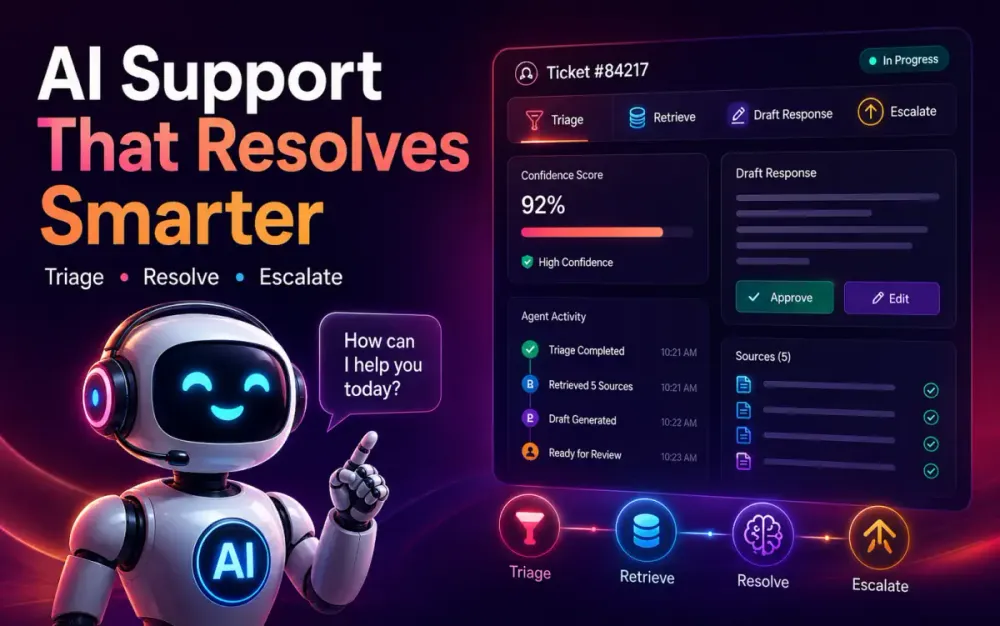
An AI-powered customer support agent is not just a chatbot connected to a help desk. In a production support environment, the agent has to triage tickets, retrieve the right knowledge, draft grounded responses, decide when automation is safe, and escalate cleanly when it is not.
For an enterprise implementation, a strong architecture separates three concerns: LlamaIndex for context engineering and retrieval, LangGraph for stateful workflow orchestration, and Angular for the real-time analyst and supervisor experience. This article covers the first three foundation areas: architecture, knowledge ingestion, and stateful agent workflows, following the requested outline.
1.1 The Operational Limits of Legacy Ticketing Systems
Most legacy ticketing systems were designed around forms, queues, categories, and static rules. That works when inbound issues are predictable. It breaks down when customers describe problems in natural language, attach screenshots, refer to earlier cases, or mix multiple issues in one message.
A ticket such as this is common:
We upgraded the SSO connector yesterday and now half our users cannot access the billing dashboard.
The admin console still works. We already tried rotating the client secret.
This is affecting our US enterprise users only.
A rule-based system may route this to “Login Issue” because it sees “cannot access.” A better AI triage system should understand that the issue likely involves SSO, billing dashboard access, enterprise tenant configuration, recent deployment context, and regional impact.
1.1.1 Brittle Rule-Based Routing vs. Semantic Understanding
Traditional routing logic usually depends on keywords:
if "password" in ticket_text:
    queue = "account-access"
elif "invoice" in ticket_text:
    queue = "billing"
else:
    queue = "general-support"
This is simple, but it misses intent. “I cannot see invoices after SSO login” could involve identity, billing permissions, tenant roles, or a regression. Semantic triage uses embeddings, structured extraction, and ticket history to classify based on meaning rather than exact words.
A better triage output looks like this:
{
  "intent": "sso_access_regression",
  "affected_product": "billing_dashboard",
  "severity": "high",
  "customer_tier": "enterprise",
  "requires_human_review": true,
  "candidate_queues": ["identity-platform", "billing-platform"]
}
The important shift is that the agent does not only assign a queue. It creates a structured view of the problem that later workflow nodes can use.
1.1.2 The Cost Overhead of Repetitive Tier-1 Support Tasks
Tier-1 support often spends time on tasks that are necessary but repetitive: identifying product area, checking known issues, asking for missing logs, suggesting documented fixes, and escalating incomplete tickets.
An AI support agent can reduce this load by preparing the ticket before a human touches it. It can summarize the issue, detect missing fields, retrieve relevant knowledge base entries, suggest a response, and flag whether the answer is safe to send automatically.
The goal is not to remove human support engineers. The goal is to stop wasting their time on classification, lookup, and boilerplate.
1.2 Structural Separation: Context Engineering vs. Workflow State
A common design mistake is to make one “agent” responsible for everything: retrieval, reasoning, tool use, escalation, response generation, and UI streaming. That creates a system that is hard to test and harder to debug.
A better architecture separates context engineering from workflow state.
LlamaIndex owns document ingestion, indexing, retrieval, metadata filtering, and query engines. LangGraph owns the state machine: what step runs next, what was already retrieved, whether confidence is high enough, and whether the ticket should escalate. LlamaIndex is widely positioned as a data and retrieval framework for LLM applications, while LangGraph is designed for long-running, stateful agent orchestration.
1.2.1 Why LlamaIndex Excels as the Unified Data and Retrieval Layer
Customer support knowledge is messy. It includes PDF manuals, Markdown runbooks, CRM notes, release notes, API docs, incident reports, and historical ticket resolutions. LlamaIndex is useful because it gives architects a structured way to load, parse, index, retrieve, and query that knowledge.
For example, you may expose separate query engines for different knowledge pools:
knowledge_tools = {
    "product_docs": product_docs_query_engine,
    "incident_history": incident_history_query_engine,
    "crm_cases": crm_cases_query_engine,
    "runbooks": runbook_query_engine,
}
This matters because not all knowledge should be searched equally. A public help article may be safe for customer-facing responses. Internal incident notes may be useful for diagnosis but not safe to quote directly.
1.2.2 Why LangGraph Is the Production Choice for Deterministic, Cyclic Agent Workflows
Support workflows are rarely linear. A ticket may go through triage, retrieval, draft generation, verification, clarification, escalation, and then back to retrieval after a human adds context.
LangGraph is a good fit because it models work as a graph of nodes and edges. Its StateGraph lets nodes read and write shared state, and each node returns a partial state update rather than mutating everything at once.
A simplified flow:
triage -> retrieve_context -> draft_response -> verify_grounding
                          -> escalate
                          -> request_clarification
                          -> finalize
The benefit is control. You can explicitly decide when the agent is allowed to answer, when it must ask for more information, and when it must stop.
1.3 High-Level Component Topography
A practical enterprise design usually has four layers:
Sources
  PDF docs, wiki pages, CRM tickets, chat transcripts, release notes

AI Backend
  LlamaIndex ingestion, vector store, LangGraph workflow, LLM gateway

Application Backend
  Ticket API, auth, audit logs, policy checks, notification service

Angular Frontend
  Support dashboard, live agent trace, HITL review, response editor
Angular is a strong fit for the operator dashboard because modern Angular supports standalone components and fine-grained reactive state with Signals, while RxJS remains useful for streams such as server-sent events from the backend. Angular’s standalone component model reduces reliance on NgModules and is the recommended modern authoring style.
1.3.1 Data Flow: Ingestion Boundary to Real-Time UI Interaction
The ingestion path should be asynchronous. Do not block ticket processing because a PDF manual is being re-indexed.
A typical flow:
Document uploaded
  -> ingestion event emitted
  -> parser extracts text and metadata
  -> nodes are created
  -> embeddings are generated
  -> vector store is updated
  -> retrieval index version is recorded
The runtime ticket path is separate:
Ticket created
  -> LangGraph triage starts
  -> LlamaIndex retrieves context
  -> draft response generated
  -> verification node checks grounding
  -> Angular dashboard streams status
This separation prevents knowledge ingestion failures from taking down active support workflows.
1.3.2 Asynchronous API Boundaries Between Python AI Microservices and the Frontend
The AI backend should expose coarse-grained APIs instead of leaking internal agent steps directly.
Recommended boundary:
POST /api/tickets/{ticketId}/agent-runs
GET  /api/tickets/{ticketId}/agent-runs/{runId}/events
POST /api/tickets/{ticketId}/agent-runs/{runId}/human-review
The Angular UI can subscribe to events without needing to understand LlamaIndex or LangGraph internals.
export interface AgentEvent {
  runId: string;
  type: 'triage' | 'retrieval' | 'draft' | 'verification' | 'escalation';
  message: string;
  timestamp: string;
}
This keeps the frontend stable even when backend workflow internals evolve.
2 Data Ingestion and Context Engineering with LlamaIndex
The quality of an AI support agent depends heavily on the quality of its context. A weak retrieval layer creates confident but wrong answers. A strong retrieval layer gives the workflow precise, scoped, version-aware evidence.
2.1 Designing the Enterprise Knowledge Pipeline
A support knowledge pipeline should treat every source as unreliable until it is parsed, cleaned, tagged, and versioned.
2.1.1 Ingesting Messy Corporate Data
Support data rarely arrives in a clean format. PDFs may contain tables. Markdown pages may be duplicated. CRM logs may include private customer details. Historical tickets may contain outdated workarounds.
A simple ingestion skeleton:
from llama_index.core import SimpleDirectoryReader, VectorStoreIndex
from llama_index.core.node_parser import SentenceSplitter

documents = SimpleDirectoryReader("./knowledge_base").load_data()

parser = SentenceSplitter(
    chunk_size=512,
    chunk_overlap=80
)

nodes = parser.get_nodes_from_documents(documents)

index = VectorStoreIndex(nodes)
query_engine = index.as_query_engine(similarity_top_k=5)
This is enough for a prototype. In production, add source metadata, tenant identifiers, document versions, access policies, and deletion handling.
2.1.2 Handling Document Versioning and Real-Time Knowledge Base Updates
Support knowledge changes constantly. A solution that still retrieves last quarter’s workaround after a fix was released is dangerous.
Each node should carry version metadata:
for node in nodes:
    node.metadata.update({
        "source_system": "confluence",
        "doc_version": "2026.06",
        "product": "billing",
        "visibility": "internal",
        "tenant_scope": "global"
    })
When a document is updated, mark older nodes as inactive instead of blindly appending new ones. This avoids stale retrieval.
UPDATE knowledge_nodes
SET active = false
WHERE source_document_id = :doc_id
  AND doc_version < :latest_version;
The trade-off is operational complexity. Version-aware retrieval needs more metadata and cleanup jobs, but it prevents the agent from grounding answers in obsolete content.
2.2 Advanced Chunking and Node Parsing Layouts
Chunking is not a formatting detail. It directly affects answer quality.
Small chunks improve retrieval precision but may lack context. Large chunks preserve meaning but can reduce search accuracy and increase token cost.
2.2.1 Implementing Hierarchical Node Parsers to Retain Parent-Child Document Context
Hierarchical parsing helps when documents have nested structure, such as product manuals or troubleshooting guides. LlamaIndex provides hierarchical parsing capabilities that split documents into recursive node hierarchies while returning a flat list of nodes with parent-child relationships.
Conceptually:
from llama_index.core.node_parser import HierarchicalNodeParser

parser = HierarchicalNodeParser.from_defaults(
    chunk_sizes=[2048, 512, 128]
)

nodes = parser.get_nodes_from_documents(documents)
Use this when a small child chunk is relevant but the answer needs surrounding parent context. For example, the retrieved child node may say “rotate the client secret,” but the parent section explains that this only applies to OAuth-based SSO, not SAML.
2.2.2 Setting Up Sentence Window Retrieval
Sentence window retrieval stores small sentence-level embeddings but expands the generation context around the matched sentence. This decouples retrieval precision from answer context size.
Useful pattern:
from llama_index.core.node_parser import SentenceWindowNodeParser

node_parser = SentenceWindowNodeParser.from_defaults(
    window_size=3,
    window_metadata_key="window",
    original_text_metadata_key="original_sentence"
)

nodes = node_parser.get_nodes_from_documents(documents)
Use this for troubleshooting content where the exact sentence matters, but the answer needs nearby warnings, prerequisites, or exceptions.
2.3 Metadata Enrichment for Precision Scoping
Vector similarity alone is not enough for enterprise support. Two products may use the same term differently. Two tenants may have different configurations. Two versions may have opposite fixes.
2.3.1 Automated Metadata Extraction
Metadata extraction can be rule-based, model-assisted, or both.
from pydantic import BaseModel
from typing import Literal

class SupportMetadata(BaseModel):
    product: Literal["billing", "identity", "analytics", "crm"]
    audience: Literal["customer", "internal", "partner"]
    severity_relevance: Literal["low", "medium", "high"]
    contains_customer_data: bool
A metadata enrichment step can classify documents before indexing. Human review is still needed for high-risk labels such as “customer-visible” or “regulated-data.”
2.3.2 Constructing Dynamic Metadata Filters
At query time, the agent should filter before searching where possible.
filters = {
    "product": ticket.product,
    "audience": "customer",
    "active": True,
    "doc_version": ticket.product_version
}
This reduces the search space and lowers the chance of retrieving irrelevant but semantically similar content.
Incorrect:
Search all company knowledge for every ticket.Better:
Search active customer-safe billing documents for version 2026.06.Recommended:
Search scoped product docs first, then internal runbooks only if public docs fail.2.4 Production Vector Store Configurations
In production, use a vector store that supports filtering, indexing, backup, observability, and tenant isolation.
2.4.1 Integrating Enterprise-Grade Vector Databases
Qdrant and PostgreSQL with pgvector are common choices. Qdrant has a LlamaIndex vector store integration, and pgvector is attractive when teams already operate PostgreSQL and want relational metadata close to embeddings.
Example Qdrant setup:
from qdrant_client import QdrantClient
from llama_index.vector_stores.qdrant import QdrantVectorStore
from llama_index.core import StorageContext, VectorStoreIndex

client = QdrantClient(url="http://localhost:6333")

vector_store = QdrantVectorStore(
    client=client,
    collection_name="support_knowledge"
)

storage_context = StorageContext.from_defaults(vector_store=vector_store)

index = VectorStoreIndex(
    nodes,
    storage_context=storage_context
)
For multi-tenant systems, include tenant or organization keys in metadata and enforce them at the API layer and vector query layer.
2.4.2 Configuring Hybrid Search
Hybrid search combines sparse keyword matching with dense vector embeddings. It helps when tickets include exact error codes, API names, SKU identifiers, or release numbers.
Example issue:
Error: AADSTS7000215 after rotating client secretA dense embedding may understand the concept. Sparse search ensures the exact error code is not ignored. For support systems, hybrid retrieval is often better than pure vector search because technical tickets contain precise identifiers.
3 Stateful Agent Workflows with LangGraph
Once retrieval is reliable, the next problem is workflow control. The agent needs memory of what it has done, not just a prompt.
3.1 Modeling Support Agents as State Machines
A support agent should behave like a controlled state machine, not an open-ended conversation.
3.1.1 Moving Past Linear Chains to Cyclical Graph Structures
A linear chain is easy to build:
classify -> retrieve -> answerBut real support needs loops:
classify -> retrieve -> draft -> verify
                       -> retrieve_more
                       -> clarify
                       -> escalate
If grounding fails, the agent should not answer. It should retrieve more evidence, ask for missing information, or escalate.
3.1.2 Visualizing Nodes as Execution Steps and Edges as Routing Choices
Each node performs one job. Each edge decides what happens next.
triage_node
  -> resolver_node
  -> verification_node
  -> finalize_node

verification_node
  -> resolver_node if evidence is weak
  -> escalation_node if risk is high
  -> finalize_node if confidence is acceptable
This makes the system easier to test because each node has a clear contract.
3.2 Defining the Unified System State Schema
The state schema is the backbone of the agent. Keep it explicit.
3.2.1 Creating Robust State Containers
from typing import List, Literal, Optional, TypedDict
from pydantic import BaseModel

class RetrievedContext(BaseModel):
    source_id: str
    title: str
    text: str
    confidence: float
    visibility: Literal["customer", "internal"]

class TicketState(TypedDict, total=False):
    ticket_id: str
    customer_message: str
    intent: str
    severity: Literal["low", "medium", "high", "critical"]
    retrieved_contexts: List[RetrievedContext]
    draft_response: str
    confidence_score: float
    route: Literal["resolve", "clarify", "escalate"]
Typed state reduces accidental coupling. It also makes debugging easier because every node reads and writes known fields.
3.2.2 Tracking Message History, Retrieved Contexts, and Routing Flags
Do not store only the final answer. Store the intermediate decisions:
{
  "intent": "sso_access_regression",
  "retrieved_sources": ["kb-192", "incident-441"],
  "confidence_score": 0.71,
  "route": "escalate",
  "reason": "Enterprise customer, active access outage, internal incident match found."
}
This audit trail matters for support quality, compliance, and post-incident review.
3.3 Core Node Topography and State Transitions
A minimal production workflow can start with three nodes: triage, resolver, and escalation.
3.3.1 Constructing the Entry Triage Node, Resolver Node, and Escalation Node
from langgraph.graph import StateGraph, START, END

def triage_node(state: TicketState) -> TicketState:
    # In production, call a structured-output LLM or classifier here.
    text = state["customer_message"].lower()

    if "sso" in text or "login" in text:
        intent = "identity_access"
    else:
        intent = "general_support"

    return {
        "intent": intent,
        "severity": "high" if "cannot access" in text else "medium"
    }

def resolver_node(state: TicketState) -> TicketState:
    # Query LlamaIndex based on intent and metadata filters.
    contexts = []  # replace with query_engine.query(...)
    draft = "Based on the available documentation, here is the recommended next step..."
    return {
        "retrieved_contexts": contexts,
        "draft_response": draft,
        "confidence_score": 0.68
    }

def escalation_node(state: TicketState) -> TicketState:
    return {
        "route": "escalate",
        "draft_response": "This ticket should be escalated to an identity platform engineer."
    }
3.3.2 Writing Explicit State Transition Logic
def route_after_resolver(state: TicketState) -> str:
    if state.get("severity") == "critical":
        return "escalate"

    if state.get("confidence_score", 0) < 0.75:
        return "escalate"

    return "finalize"

def finalize_node(state: TicketState) -> TicketState:
    return {"route": "resolve"}

graph = StateGraph(TicketState)

graph.add_node("triage", triage_node)
graph.add_node("resolver", resolver_node)
graph.add_node("escalate", escalation_node)
graph.add_node("finalize", finalize_node)

graph.add_edge(START, "triage")
graph.add_edge("triage", "resolver")

graph.add_conditional_edges(
    "resolver",
    route_after_resolver,
    {
        "escalate": "escalate",
        "finalize": "finalize"
    }
)

graph.add_edge("escalate", END)
graph.add_edge("finalize", END)

support_agent = graph.compile()
The key design choice is that routing is not hidden inside a prompt. The workflow uses explicit transition logic. That makes behavior testable, explainable, and safer for enterprise support.
4 Automated Ticket Triage and Intent Classification
Automated triage is where the support agent becomes operationally useful. The system should not jump directly from a customer message to a final answer. It should first normalize the ticket into a typed structure that downstream nodes can trust. That structure becomes the input for routing, retrieval, SLA calculation, escalation, and response drafting.
4.1 Semantic Triage: Converting Unstructured Inputs to Schema
A ticket usually arrives as a loose mix of symptoms, product names, timestamps, customer emotion, and missing details. The first job of semantic triage is to convert that message into a schema. This gives the workflow a stable contract and avoids passing raw text into every decision point.
4.1.1 Using Structured LLM Outputs to Parse Inbound Tickets into Typed Objects
The triage node should produce a typed object, not a paragraph. For example, instead of asking the model “What is this ticket about?”, ask it to return a constrained object with intent, product, severity signals, missing fields, and escalation risk.
from enum import Enum
from pydantic import BaseModel, Field
from typing import List, Optional


class TicketIntent(str, Enum):
    BILLING = "billing"
    TECHNICAL_BUG = "technical_bug"
    ACCOUNT_ACCESS = "account_access"
    FEATURE_REQUEST = "feature_request"
    SECURITY = "security"
    UNKNOWN = "unknown"


class TriageResult(BaseModel):
    intent: TicketIntent
    product_area: Optional[str] = None
    affected_users: Optional[int] = None
    customer_tier: Optional[str] = None
    severity_hint: str = Field(description="low, medium, high, or critical")
    missing_information: List[str] = []
    escalation_risk: bool = False
    summary: str
A production implementation should validate this object before moving to the next node. If the LLM returns an unsupported intent or incomplete severity value, the graph should route to a fallback node rather than continue with bad state.
def validate_triage(result: TriageResult) -> bool:
    if result.intent == TicketIntent.UNKNOWN:
        return False

    if result.severity_hint not in {"low", "medium", "high", "critical"}:
        return False

    return True
This keeps the workflow predictable. The model can interpret language, but the application still owns the contract.
4.1.2 Resolving Customer Intent
Intent resolution should combine model output with deterministic checks. For example, if a ticket mentions “invoice,” “charge,” and “refund,” billing is likely. But if it also contains “403,” “SAML,” or “client secret,” account access or identity should take priority.
def normalize_intent(raw_intent: TicketIntent, text: str) -> TicketIntent:
    lower = text.lower()

    identity_terms = ["sso", "saml", "oauth", "403", "mfa", "client secret"]
    security_terms = ["breach", "credential leak", "unauthorized access"]

    if any(term in lower for term in security_terms):
        return TicketIntent.SECURITY

    if any(term in lower for term in identity_terms):
        return TicketIntent.ACCOUNT_ACCESS

    return raw_intent
The trade-off is that deterministic overrides need maintenance. But they are useful for high-risk categories where the business cannot rely only on generative interpretation.
4.2 Algorithmic Priority Matrixing
Intent tells the agent what the issue is. Priority tells the organization how fast it must act. This should not be decided by the LLM alone. Use a scoring function that combines customer tier, impact, sentiment, SLA policy, and risk category.
4.2.1 Dynamically Extracting Customer Tier Status and Mapping It to Internal SLAs
Customer tier should come from a trusted system such as CRM or subscription data, not from the customer’s message. A customer may say “we are enterprise,” but the workflow should verify that claim.
SLA_MATRIX = {
    "enterprise": {"critical": 30, "high": 120, "medium": 480, "low": 1440},
    "business": {"critical": 60, "high": 240, "medium": 720, "low": 2880},
    "standard": {"critical": 120, "high": 480, "medium": 1440, "low": 4320},
}


def calculate_sla_minutes(customer_tier: str, severity: str) -> int:
    tier_policy = SLA_MATRIX.get(customer_tier, SLA_MATRIX["standard"])
    return tier_policy.get(severity, tier_policy["medium"])
This approach keeps the decision explainable. If a ticket receives a two-hour SLA, the reason is visible: enterprise customer, high severity, confirmed impact.
4.2.2 Sentiment Analysis Integration to Catch and Elevate Highly Frustrated Tickets
Sentiment should not replace severity, but it should influence handling. A low-severity ticket from a frustrated customer may still need faster human review because the relationship risk is high.
def sentiment_boost(sentiment_score: float, current_priority: int) -> int:
    """
    sentiment_score range:
    -1.0 = very negative
     0.0 = neutral
     1.0 = positive
    Lower priority number means higher urgency.
    """
    if sentiment_score <= -0.75:
        return max(1, current_priority - 1)

    return current_priority
Use this carefully. A frustrated tone should not automatically mark a ticket as critical, but it can move the ticket higher within the same operational queue.
4.3 Data Privacy and Security Gates
Triage is also the first security boundary. Before any model call, the system should inspect the ticket for sensitive values, credentials, regulated identifiers, and tenant-specific data exposure.
4.3.1 Implementing Local PII Scrubbing Patterns Before LLM Processing
A simple local scrubber can remove common identifiers before the ticket is sent to an external model. In production, combine this with enterprise DLP tools, but even local pattern detection is useful as a first gate.
import re

PII_PATTERNS = {
    "email": r"[A-Za-z0-9._%+-]+@[A-Za-z0-9.-]+\.[A-Za-z]{2,}",
    "phone": r"\+?\d[\d\s().-]{8,}\d",
    "api_key": r"(sk|pk|api|token)_[A-Za-z0-9_\-]{16,}",
}


def scrub_sensitive_text(text: str) -> tuple[str, dict]:
    replacements = {}

    for label, pattern in PII_PATTERNS.items():
        matches = re.findall(pattern, text)
        for index, match in enumerate(matches):
            placeholder = f"[REDACTED_{label.upper()}_{index}]"
            replacements[placeholder] = match
            text = text.replace(match, placeholder)

    return text, replacements
The original values should be stored only in approved secure storage. The graph state should carry placeholders unless a downstream internal tool explicitly needs the original value.
4.3.2 Handling Sensitive Credentials and Securing Tenant Isolation Boundaries
Tenant isolation must be enforced before retrieval. The agent should never search another customer’s historical tickets simply because the embedding is similar.
def build_retrieval_filter(state: dict) -> dict:
    return {
        "tenant_id": state["tenant_id"],
        "product_area": state.get("product_area"),
        "active": True,
        "visibility": "customer_safe"
    }
The rule is simple: tenant scope is not optional metadata. It is a security boundary. Every retrieval call, CRM lookup, and audit event should include tenant identity.
4.4 Conditional Graph Routing Mechanics
Once triage is complete, routing should be explicit. The graph should not rely on an LLM to casually decide whether to answer, clarify, or escalate.
4.4.1 Defining LangGraph Conditional Edges Based on Triage Outputs
def route_after_triage(state: dict) -> str:
    triage = state["triage"]

    if triage["intent"] == "security":
        return "security_escalation"

    if triage["escalation_risk"]:
        return "human_review"

    if triage["missing_information"]:
        return "request_clarification"

    return "retrieve_context"
This gives architects a clean control point. Policy decisions remain visible in code, while language interpretation remains isolated inside triage.
4.4.2 Managing Fallback Routes When Incoming Intents Are Ambiguous
Ambiguity should not be treated as failure. It should be treated as a normal path.
def ambiguity_handler(state: dict) -> dict:
    return {
        "route": "request_clarification",
        "clarifying_question": (
            "Can you confirm whether this issue is related to billing, "
            "account access, or a technical error in the product?"
        )
    }
The fallback route protects answer quality. It is better to ask one targeted question than to generate a confident response against the wrong intent.
5 Autonomous Resolution: Multi-Strategy Agentic RAG
Once a ticket is classified, the agent can attempt resolution. The strongest pattern is not one generic retrieval call. It is multi-strategy retrieval, where the graph selects the right knowledge source, decomposes complex questions, verifies grounding, and only then drafts a response.
5.1 Encapsulating LlamaIndex as Executable LangGraph Tools
The graph should treat retrieval as a tool with a clear interface. This avoids binding workflow logic directly to one index implementation.
5.1.1 Exposing Specific Query Engines as Functional Tools for the Graph Agent
def query_product_docs(question: str, filters: dict) -> str:
    response = product_docs_engine.query(
        question,
        filters=filters
    )
    return str(response)


def query_incident_history(question: str, filters: dict) -> str:
    response = incident_history_engine.query(
        question,
        filters=filters
    )
    return str(response)
Each tool should represent a knowledge boundary. Product docs are customer-safe. Incident history is internal. Runbooks may contain operational steps that should not be sent directly to customers.
5.1.2 Granting Agents Explicit Choice Over Which Knowledge Pool to Query
The resolver node can choose sources based on intent and severity.
def select_retrieval_sources(state: dict) -> list[str]:
    intent = state["triage"]["intent"]
    severity = state["triage"]["severity_hint"]

    if intent == "account_access" and severity in {"high", "critical"}:
        return ["product_docs", "incident_history", "runbooks"]

    if intent == "billing":
        return ["product_docs", "crm_cases"]

    return ["product_docs"]
This keeps retrieval scoped but flexible. The graph is allowed to use deeper internal sources only when the ticket justifies it.
5.2 Multi-Step Query Decomposition Strategies
Many tickets contain more than one issue. A good resolver splits them before retrieval.
5.2.1 Handling Multi-Part User Issues by Splitting Them into Individual Sub-Questions
def decompose_ticket(summary: str) -> list[str]:
    return [
        "What are the likely causes of the reported access failure?",
        "Are there known incidents affecting this product area?",
        "What customer-safe troubleshooting steps should be recommended?"
    ]
In production, decomposition can be LLM-assisted, but the result should still be bounded. Avoid generating ten sub-questions for a simple ticket. More retrieval is not always better.
5.2.2 Recomposing Independent Lookup Results into a Singular, Cohesive Response
After retrieval, the resolver should merge evidence into one response plan.
def compose_resolution_plan(results: dict) -> dict:
    return {
        "likely_cause": results.get("cause"),
        "known_incident": results.get("incident"),
        "recommended_steps": results.get("steps", []),
        "customer_safe": True if results.get("steps") else False
    }
This intermediate plan is more useful than a raw answer. It can be checked, scored, edited, and audited before becoming a customer-facing response.
5.3 Hallucination Control and Context Verification
Grounding checks should happen before response synthesis. The agent must prove that the answer is supported by retrieved context.
5.3.1 Implementing Self-Correction Cycles
def verify_context_relevance(ticket_summary: str, contexts: list[dict]) -> bool:
    if not contexts:
        return False

    matching_contexts = [
        c for c in contexts
        if c.get("score", 0) >= 0.72 and c.get("active") is True
    ]

    return len(matching_contexts) > 0
If verification fails, the graph should retrieve again with a narrower query or route to escalation. It should not fill gaps from model memory.
5.3.2 Grading Output Responses for Exact Grounding
def grounding_score(draft: str, contexts: list[dict]) -> float:
    supported_claims = 0
    total_claims = max(1, len(draft.split(".")))

    combined_context = " ".join(c["text"].lower() for c in contexts)

    for sentence in draft.split("."):
        important_terms = [
            word for word in sentence.lower().split()
            if len(word) > 5
        ]

        if important_terms and any(term in combined_context for term in important_terms):
            supported_claims += 1

    return supported_claims / total_claims
This is not a perfect evaluator, but it shows the pattern. A production evaluator can use stronger claim extraction and model-based grading.
5.4 Response Synthesis and Confidence Scoring
The final response should be helpful, grounded, and policy-compliant.
5.4.1 Enforcing Brand Guidelines and Deterministic Phrasing Constraints
BRAND_RULES = """
Use a calm, direct support tone.
Do not mention internal incident IDs.
Do not expose internal runbook names.
Do not promise resolution timelines unless an SLA is confirmed.
Ask for missing logs only if required by the retrieved troubleshooting steps.
"""
The response generator should receive both the resolution plan and the writing constraints. This prevents technically correct answers that are unsafe or poorly phrased.
5.4.2 Generating Confidence Scores to Guide Automatic Draft Approval
def calculate_confidence(retrieval_score: float, grounding: float, policy_pass: bool) -> float:
    if not policy_pass:
        return 0.0

    return round((retrieval_score * 0.45) + (grounding * 0.45) + 0.10, 2)


def approval_route(confidence: float) -> str:
    if confidence >= 0.85:
        return "auto_send_candidate"

    if confidence >= 0.70:
        return "human_review"

    return "escalate"
Automatic sending should be rare at first. Most teams start with draft generation, measure quality, and slowly widen automation boundaries.
6 Human-in-the-Loop and Escalation Mechanics
Human-in-the-loop is not a backup plan. It is part of the architecture. The system should know when to pause, what to show the reviewer, and how to resume without losing context.
6.1 Defining the Escalation Threshold
Escalation should be based on policy, confidence, customer impact, and safety.
6.1.1 Catching Out-of-Distribution Queries, Low Confidence Scores, or Failed Self-Correction Cycles
def should_escalate(state: dict) -> bool:
    if state["triage"]["intent"] == "security":
        return True

    if state.get("confidence_score", 0) < 0.70:
        return True

    if state.get("retrieval_attempts", 0) >= 2 and not state.get("grounded"):
        return True

    return False
This prevents infinite retry loops. The graph gets a few controlled attempts, then hands off.
6.1.2 Structuring State Payloads for Clean Human Handoffs
def build_handoff_payload(state: dict) -> dict:
    return {
        "ticket_id": state["ticket_id"],
        "summary": state["triage"]["summary"],
        "intent": state["triage"]["intent"],
        "severity": state["triage"]["severity_hint"],
        "draft_response": state.get("draft_response"),
        "evidence": state.get("retrieved_contexts", []),
        "reason_for_review": state.get("escalation_reason", "Requires human judgment")
    }
A reviewer should not reconstruct the agent’s work from logs. The handoff payload should explain what happened and why.
6.2 State Persistence via LangGraph Checkpointers
Support workflows may pause for minutes, hours, or days. The graph state needs durable persistence.
6.2.1 Configuring Durable In-Memory or Database-Backed Savers
from langgraph.checkpoint.memory import InMemorySaver

checkpointer = InMemorySaver()

compiled_graph = graph.compile(
    checkpointer=checkpointer
)

config = {
    "configurable": {
        "thread_id": "ticket-98231"
    }
}
In-memory persistence is useful for local development. Production systems should use a durable store so a worker restart does not lose active reviews.
6.2.2 Using Checkpoints to Freeze Active Agent Sessions During Manual Evaluation
The checkpoint should capture the state at the review boundary. That allows the UI to show the exact draft, evidence, and route decision the agent produced.
result = compiled_graph.invoke(
    {
        "ticket_id": "98231",
        "customer_message": "Users cannot access the billing dashboard after SSO update."
    },
    config=config
)
When the reviewer returns later, the system resumes from the saved thread instead of starting from the beginning.
6.3 The Interruption Boundary: Pausing and State Editing
Interrupts are useful when the workflow needs external input. The graph can pause and wait for a human decision.
6.3.1 Leveraging LangGraph Interrupt Primitives
from langgraph.types import interrupt


def human_review_node(state: dict) -> dict:
    review_payload = build_handoff_payload(state)

    decision = interrupt({
        "type": "human_review_required",
        "payload": review_payload
    })

    return {
        "human_decision": decision
    }
The interrupt payload should be JSON-serializable and UI-friendly. Avoid sending raw internal objects.
6.3.2 Allowing Human Operators to Rewrite Agent Drafts or Manually Redirect Graph Paths
def route_after_human_review(state: dict) -> str:
    decision = state["human_decision"]

    if decision["action"] == "approve":
        return "finalize"

    if decision["action"] == "edit":
        return "finalize_with_edits"

    if decision["action"] == "escalate":
        return "specialist_queue"

    return "request_clarification"
Human review should not be a dead end. It should feed structured decisions back into the graph.
6.4 Session Rehydration and Long-Running Transactions
Long-running support cases need careful resume behavior. A reviewer may edit the draft after an incident status changes, or a customer may add logs while the ticket is paused.
6.4.1 Resuming Interrupted Processes Across Asynchronous Server Instances
resume_config = {
    "configurable": {
        "thread_id": "ticket-98231"
    }
}

resume_input = {
    "human_decision": {
        "action": "edit",
        "edited_response": "Thanks for the details. We are routing this to our identity team..."
    }
}

resumed = compiled_graph.invoke(
    resume_input,
    config=resume_config
)
The thread ID is the continuity key. Any worker that can access the checkpoint store can resume the workflow.
6.4.2 Ensuring Fault Tolerance When Human Reviews Take Hours or Days to Resolve
Before resuming, check whether the ticket changed.
def validate_resume(ticket_updated_at: str, checkpoint_created_at: str) -> bool:
    return ticket_updated_at <= checkpoint_created_at
If the ticket changed after the checkpoint, route back to triage or retrieval. This avoids sending a response based on stale context.
I verified the current Angular guidance around Signals and standalone components, plus current observability/evaluation references for LangSmith, OpenTelemetry, and Phoenix before continuing. Angular documents Signals as fine-grained reactive state and standalone components as the modern simplified component model; LangSmith documents tracing/production monitoring, including OpenTelemetry support; Phoenix documents RAG evaluation workflows.
7 The Architect’s Dashboard: Real-Time Angular Command Center
The dashboard is where the support agent becomes visible and controllable. Support leads need to see live ticket state, current agent activity, retrieved evidence, draft responses, and human review actions without refreshing the page. Angular works well here because the UI can be built as focused standalone components with reactive state around tickets, agent runs, and review decisions.
7.1 Modern Angular Core Architecture
The frontend should not treat the agent as a black box. It should model the agent run as a first-class UI object with status, events, draft content, confidence score, and review state.
7.1.1 Utilizing Angular Signals for Fine-Grained Reactive State Tracking Within Ticketing Views
Signals are useful for local UI state that changes frequently. A ticket workspace may receive streaming events every few hundred milliseconds, while only parts of the screen need to update.
import { Injectable, computed, signal } from '@angular/core';

export interface AgentRunState {
  runId: string;
  ticketId: string;
  status: 'idle' | 'running' | 'review_required' | 'completed' | 'failed';
  draftResponse: string;
  confidenceScore: number;
  events: AgentRunEvent[];
}

export interface AgentRunEvent {
  type: string;
  message: string;
  timestamp: string;
}

@Injectable({ providedIn: 'root' })
export class AgentRunStore {
  private readonly state = signal<AgentRunState>({
    runId: '',
    ticketId: '',
    status: 'idle',
    draftResponse: '',
    confidenceScore: 0,
    events: []
  });

  readonly current = this.state.asReadonly();

  readonly needsReview = computed(() =>
    this.state().status === 'review_required' ||
    this.state().confidenceScore < 0.75
  );

  appendEvent(event: AgentRunEvent): void {
    this.state.update(current => ({
      ...current,
      events: [...current.events, event]
    }));
  }

  updateDraft(draftResponse: string, confidenceScore: number): void {
    this.state.update(current => ({
      ...current,
      draftResponse,
      confidenceScore
    }));
  }
}
This keeps agent state close to the workspace and avoids unnecessary global store complexity. Use a broader state management library only when multiple modules need the same synchronized state.
7.1.2 Structuring Highly Performance-Optimized, Standalone Components for Agent Workspaces
A practical dashboard should be composed from small standalone components: ticket summary, event stream, retrieved evidence, draft editor, and review actions.
import { Component, input } from '@angular/core';

@Component({
  selector: 'app-agent-event-stream',
  standalone: true,
  template: `
    <section>
      <h3>Agent Activity</h3>

      @for (event of events(); track event.timestamp) {
        <div class="event-row">
          <span>{{ event.type }}</span>
          <p>{{ event.message }}</p>
        </div>
      }
    </section>
  `
})
export class AgentEventStreamComponent {
  events = input.required<AgentRunEvent[]>();
}
The important design choice is separation. The event stream should not own the review form. The draft editor should not fetch the ticket. Each component should receive the data it needs and emit focused actions.
7.2 Real-Time Streaming and Server-Sent Events
For one-way streaming from backend to browser, Server-Sent Events are simpler than WebSockets. SSE is a good fit when the backend pushes agent events, token chunks, retrieval notices, and review-state changes, while the UI sends human actions through normal HTTP APIs.
7.2.1 Building Stream Ingestion Services Using RxJS to Consume Token-by-Token LLM Output
Wrap EventSource in an RxJS observable so Angular components can subscribe cleanly and unsubscribe when destroyed.
import { Injectable, NgZone } from '@angular/core';
import { Observable } from 'rxjs';

@Injectable({ providedIn: 'root' })
export class AgentStreamService {
  constructor(private readonly zone: NgZone) {}

  connect(runId: string): Observable<AgentRunEvent> {
    return new Observable<AgentRunEvent>(observer => {
      const source = new EventSource(`/api/agent-runs/${runId}/events`);

      source.onmessage = message => {
        this.zone.run(() => {
          observer.next(JSON.parse(message.data));
        });
      };

      source.onerror = error => {
        this.zone.run(() => observer.error(error));
        source.close();
      };

      return () => source.close();
    });
  }
}
The backend should send compact event payloads. Do not stream full graph state on every update. Stream deltas, then let the UI request full state only when the reviewer opens a detailed panel.
7.2.2 Visualizing Intermediate Agent Thoughts and Tool Calls Live in the UI
Do not display private chain-of-thought style reasoning. Show operational events instead: “triage completed,” “searched product docs,” “grounding check failed,” or “human review required.”
{
  "type": "retrieval",
  "message": "Searched customer-safe billing documentation for product version 2026.06.",
  "timestamp": "2026-06-06T10:21:18Z"
}
This gives supervisors enough transparency without exposing sensitive prompts or internal reasoning artifacts.
7.3 Interactive Human Intervention Interfaces
The human review screen should show the ticket, the agent’s draft, supporting evidence, and the reason review was required. The reviewer should be able to approve, edit, escalate, or request more information.
7.3.1 Designing Forms to Let Human Reviewers View State History and Modify Agent Context
import { Component, signal } from '@angular/core';
import { FormsModule } from '@angular/forms';

@Component({
  selector: 'app-human-review-panel',
  standalone: true,
  imports: [FormsModule],
  template: `
    <label>Draft Response</label>
    <textarea [(ngModel)]="editedDraft"></textarea>

    <label>Reviewer Note</label>
    <textarea [(ngModel)]="reviewNote"></textarea>

    <button (click)="submit('approve')">Approve</button>
    <button (click)="submit('edit')">Submit Edits</button>
    <button (click)="submit('escalate')">Escalate</button>
  `
})
export class HumanReviewPanelComponent {
  editedDraft = '';
  reviewNote = '';

  submit(action: 'approve' | 'edit' | 'escalate'): void {
    // handled by parent or injected review service
  }
}
Keep the reviewer’s action structured. A free-text note is useful, but the graph needs a clear action value to resume correctly.
7.3.2 Implementing Safe Submit Hooks to Push State Updates Back to the Python Backend
submitReview(runId: string, payload: {
  action: 'approve' | 'edit' | 'escalate';
  editedResponse?: string;
  reviewerNote?: string;
}) {
  return this.http.post(`/api/agent-runs/${runId}/human-review`, payload);
}
The backend should validate the run status before accepting review input. Reject duplicate approvals, stale edits, and actions submitted against completed runs.
7.4 Performance and State Optimization
Enterprise support centers can have thousands of open tickets and many parallel agent runs. The UI must stay responsive under load.
7.4.1 Optimizing Large Data Tables with Virtual Scrolling for High-Throughput Enterprise Centers
Use virtual scrolling for ticket queues instead of rendering every row. Also avoid placing live token streams inside every row. Show live details only for the selected ticket.
export interface TicketQueueRow {
  ticketId: string;
  customerName: string;
  intent: string;
  priority: string;
  agentStatus: string;
  updatedAt: string;
}
The queue view should stay summary-focused. The workspace view can handle the heavier real-time details.
7.4.2 Managing Client-Side Synchronization When Backend States Are Modified Out-of-Band
Out-of-band updates happen when another reviewer acts on the same ticket, a backend retry changes the graph state, or a customer adds information. Use version numbers to prevent stale writes.
export interface ReviewSubmission {
  runId: string;
  expectedVersion: number;
  action: 'approve' | 'edit' | 'escalate';
  editedResponse?: string;
}
If the backend version has changed, return a conflict response and ask the UI to reload the latest state before allowing submission.
8 Production Operations, Observability, and Scalability
A support agent is not production-ready until it can be observed, evaluated, scaled, and cost-controlled. The system needs the same operational discipline as any other enterprise platform, plus additional controls for retrieval quality and model behavior.
8.1 End-to-End Distributed Tracing
A single ticket run may touch the Angular UI, API gateway, LangGraph workflow, LlamaIndex retrieval layer, vector database, CRM, and LLM provider. Without tracing, failures are hard to diagnose.
8.1.1 Instrumenting the Entire Platform Using Tools Like LangSmith or OpenTelemetry-Based TraceAI
Each run should carry a correlation ID from the first API call through every backend operation.
import logging
from contextvars import ContextVar

correlation_id = ContextVar("correlation_id", default="unknown")
logger = logging.getLogger("support-agent")

def log_agent_event(event_type: str, message: str, **fields):
    logger.info({
        "correlation_id": correlation_id.get(),
        "event_type": event_type,
        "message": message,
        **fields
    })
Use the same ID in frontend events, API logs, graph checkpoints, retrieval calls, and model traces. This lets engineers reconstruct what happened when a ticket produced a poor draft or escalated unexpectedly.
8.1.2 Tracking Latency Budgets, Catching Bottlenecks, and Logging Failed Tool Executions
Set latency budgets by step. Triage may need to finish in two seconds, retrieval in three seconds, and full draft generation in ten seconds. Failed tools should return structured errors, not raw stack traces.
from time import perf_counter

def timed_tool_call(tool_name: str, fn, *args, **kwargs):
    start = perf_counter()
    try:
        result = fn(*args, **kwargs)
        return {"ok": True, "result": result}
    except Exception as exc:
        return {"ok": False, "error": str(exc), "tool": tool_name}
    finally:
        elapsed_ms = round((perf_counter() - start) * 1000, 2)
        log_agent_event("tool_latency", f"{tool_name} completed", elapsed_ms=elapsed_ms)
This makes operational issues visible before they become support delays.
8.2 Automated Evaluation at Scale
Human review is valuable but not enough. The team needs automated evaluation for retrieval, grounding, tone, and escalation accuracy.
8.2.1 Implementing Automated Evaluation Frameworks
Build a test set from real historical tickets after removing sensitive data. Include the expected intent, correct product area, relevant documents, and acceptable response patterns.
{
  "ticket": "Users receive 403 after SSO update.",
  "expected_intent": "account_access",
  "required_sources": ["sso-troubleshooting-guide"],
  "must_not_include": ["internal incident id", "database host name"]
}
Evaluation should run before releases and after major knowledge base updates.
8.2.2 Setting Up Routine Quality Metrics for Retrieval Precision and Synthesis Accuracy
Track at least four metrics: intent accuracy, retrieval relevance, grounded response rate, and unnecessary escalation rate.
def evaluate_run(run: dict, expected: dict) -> dict:
    return {
        "intent_match": run["intent"] == expected["expected_intent"],
        "used_required_source": expected["required_source"] in run["source_ids"],
        "grounded": run["grounding_score"] >= 0.80,
        "safe_to_send": not any(term in run["draft"] for term in expected["must_not_include"])
    }
These metrics turn agent quality into an engineering process rather than a subjective review.
8.3 Cost Engineering and Latency Optimization
LLM systems can become expensive when every ticket triggers multiple large prompts. Cost controls should be designed from the start.
8.3.1 Implementing Semantic Prompt Caching Strategies to Decrease Repeating Token Costs
Cache stable retrieval results, policy prompts, and common resolution plans. Do not cache customer-specific final responses unless privacy controls are strong.
def cache_key(intent: str, product: str, version: str) -> str:
    return f"resolution-plan:{intent}:{product}:{version}"
Caching works best for common issues such as password reset, invoice download failure, SSO configuration checks, and known product limitations.
8.3.2 Managing Batch Execution Queues to Optimize LLM Throughput During Peak Traffic Hours
Queue low-priority enrichment tasks while keeping urgent tickets interactive.
def choose_queue(priority: str) -> str:
    if priority in {"critical", "high"}:
        return "interactive-agent-runs"

    return "background-enrichment"
This protects response time for urgent cases while still allowing the system to summarize and enrich lower-priority tickets.
8.4 Enterprise Multi-Tenancy and High Availability
The final production concern is scale with isolation. Every tenant, customer, and support region must be protected from accidental data crossover.
8.4.1 Architecting Database and Cache Separation Keys to Safeguard Organizational Boundaries
def tenant_cache_key(tenant_id: str, key: str) -> str:
    return f"tenant:{tenant_id}:{key}"
Use tenant keys in databases, vector metadata, queues, logs, and caches. Treat missing tenant context as a hard failure.
8.4.2 Scaling Stateless Worker Containers Horizontally to Support Thousands of Parallel Agent Loops
Keep graph workers stateless and place checkpoints, queues, and document indexes in shared services.
apiVersion: apps/v1
kind: Deployment
metadata:
  name: support-agent-worker
spec:
  replicas: 6
  selector:
    matchLabels:
      app: support-agent-worker
  template:
    metadata:
      labels:
        app: support-agent-worker
    spec:
      containers:
        - name: worker
          image: company/support-agent-worker:2026.06
          env:
            - name: CHECKPOINT_STORE
              value: postgres
            - name: VECTOR_STORE
              value: qdrant
This lets the platform scale horizontally while preserving workflow continuity through durable state.